Result Website Not Opening? 9 Things to Do on Board Result Day
At the moment a result goes live, lakhs of students open the same page together. Even well-prepared servers slow down, show a blank page or throw an error. This does not mean something is wrong with your result. It only means the queue is long.
In this article
First, understand the error
| What you see | What it means |
|---|---|
| Page keeps loading or shows 502 / 503 / 504 | Server overloaded. Nothing wrong at your end. |
| “Site can’t be reached” | Heavy traffic or a typing mistake in the address. |
| “Invalid roll number” or “No record found” | Wrong details, wrong class or stream link, or data still being uploaded. |
| Captcha fails repeatedly | Old captcha image; refresh the captcha, not the whole page. |
Nine things to do
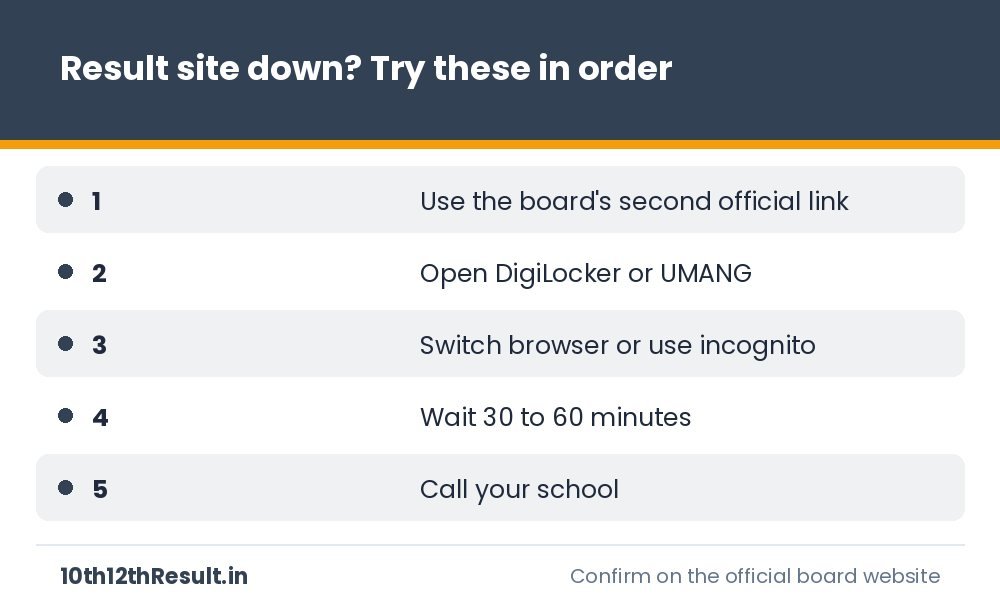
- Use the alternate official link. Most boards publish results on two or three addresses, for example a board site and an NIC results site. The press note lists them all.
- Open DigiLocker. CBSE, CISCE and many state boards push marksheets to DigiLocker. It runs on separate infrastructure.
- Try UMANG where your board is available on it.
- Use SMS if your board has announced an SMS format for the year.
- Change the browser or open an incognito window. Old cached pages often show a dead link even after the result is live.
- Switch network. Move from Wi-Fi to mobile data or the other way.
- Type the address yourself instead of following a forwarded link.
- Wait 30 to 60 minutes. Traffic falls sharply after the first hour. Your result will not change.
- Call your school. Schools receive the full result of their students through an official login or email.
What not to do
- Do not enter your roll number on unknown websites that promise a “fast server”. At best they show ads; at worst they collect your data.
- Do not pay anyone to “check” or “improve” a result.
- Do not install unknown apps or APK files shared in groups.
- Do not refresh every two seconds. It adds load and can get your connection temporarily blocked.
How to tell an official website
- Government boards mostly use addresses ending in .gov.in, .nic.in or .ac.in. A few use .org or .com addresses that are listed on the board’s own homepage.
- The link is printed in the board’s press note or on its verified social media account.
- The page asks only for exam details such as roll number and date of birth. It never asks for a bank detail, OTP or payment to view a result.
If the result opens but looks wrong
Take a screenshot, note the time and tell your school. Marks shown as blank, “absent” in a paper you wrote, or someone else’s name are data issues that the school raises with the board. Do not panic over the online display; the board’s record is what counts.
Prepare a day before
- Save a photo of your admit card.
- Activate DigiLocker and link your mobile number.
- Bookmark your board page from our All Boards list.
- Charge your phone and keep some mobile data.
Lost your roll number? See how to check a result without the admit card.
This is an independent information website and is not affiliated with any education board. Always confirm dates and rules from the official board notification.
Related guides

After 12th Result 2027: Admissions, Entrance Counselling and Documents You Need
A practical plan for the weeks after the Class 12 result: eligibility checks, CUET and counselling timelines, documents to collect from school,…
Forgot Your Roll Number? How to Check Board Result 2027 Without the Admit Card
Lost the admit card before result day? Here is where your roll number is recorded, the official ways to recover it for…
How to Calculate Percentage from Board Marks: Formulas with Examples
Simple formulas to work out your Class 10 or 12 percentage, best-of-five, PCM or PCB aggregate and CGPA conversion, with worked examples…

After 10th Result 2027: Stream Choice, Class 11 Admission and Documents Checklist
What to do in the first two weeks after the Class 10 result: verify the marksheet, choose between Science, Commerce, Arts and…