CBSE 10th Result 2027: How to Check on Website, DigiLocker and UMANG

The CBSE Class 10 board exams 2027 begin on 16 February 2027. Once evaluation is over, the board publishes the result online and does not send it to students individually. This guide shows every official way to see your marks and the exact details you should keep ready.
In this article
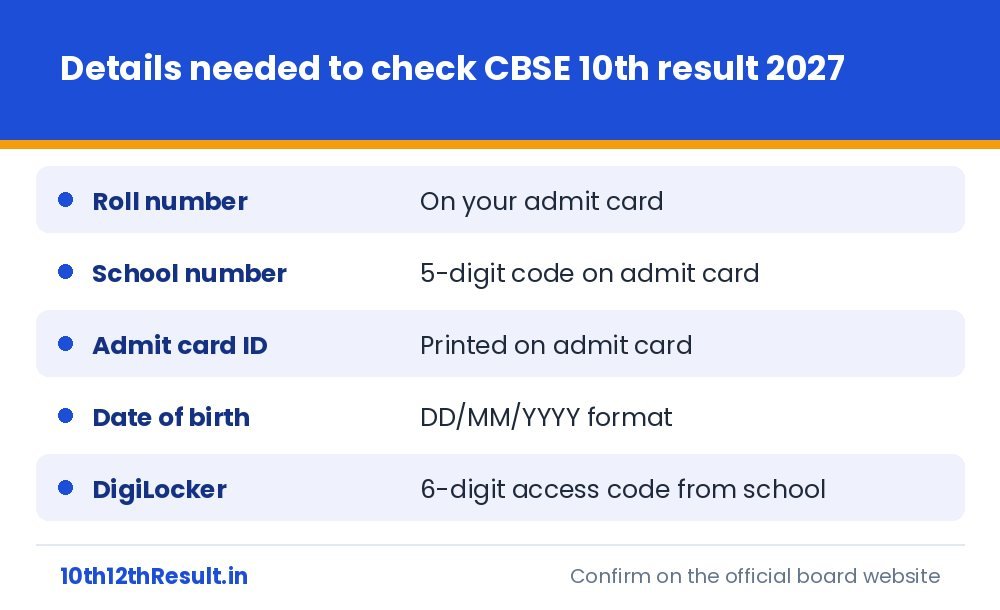
Keep these four details ready
CBSE asks for more than a roll number. Open your admit card and note down the roll number, the school number, the admit card ID and your date of birth. Most failed attempts on result day are caused by typing the school number in the wrong box or entering the date of birth in the wrong order.
Method 1: CBSE result website
- Open results.cbse.nic.in or cbseresults.nic.in. Both are official and show the same data.
- Select the link for “Secondary School Examination (Class X) Results 2027”.
- Enter the roll number, school number, admit card ID and date of birth.
- Type the security pin shown on the screen and press Submit.
- Save the page as a PDF or take a screenshot.
Method 2: DigiLocker
DigiLocker gives you a digitally signed marksheet-cum-certificate, which is more useful than a screenshot. Your school shares a six-digit access code before the result. Use it to activate the account, and the marksheet appears under “Issued Documents” once the result is out. The full process is explained in our DigiLocker access code guide.
Method 3: UMANG app
Install UMANG, sign in with your mobile number, search “CBSE” and open the Class X result service. You enter the same details as on the website. UMANG is handy when the main website is slow.
Method 4: Your school
Schools receive the complete result of all their students on their registered email and the CBSE school login. If nothing opens on your phone, call the school office.
Method 5: SMS and IVRS
In some years CBSE also activates SMS and telephone (IVRS) services and prints the numbers in the result press note. Use them only if the board’s own notice for 2027 mentions them.
What you will see on the online result
| Shown | Not shown |
|---|---|
| Subject-wise theory and internal assessment marks | Overall percentage |
| Grade in each subject | Division (first, second, third) |
| Result status: Pass, Compartment or Essential Repeat | Rank or merit position |
CBSE does not calculate an overall percentage. If a school or college needs one, it is calculated from your subject marks; see how to calculate percentage from board marks.
Common errors and quick fixes
- “Invalid details”: check the school number and admit card ID again; they are different numbers.
- Page not loading: switch to DigiLocker or UMANG instead of refreshing again and again.
- Name spelt wrong: tell your school immediately. Corrections go through the school to the CBSE regional office.
Class 10 students also get a second board exam to improve their score. Read how the two-exam result works before deciding.
This is an independent information website and is not affiliated with any education board. Always confirm dates and rules from the official board notification.
Related guides

CBSE Passing Marks 2027 and Supplementary Exam Rules for Class 10 and 12
What "33%" really means in CBSE, how theory and practical are counted in Class 12, what Compartment and Essential Repeat mean on…

CBSE Class 10 Two Board Exams 2027: How the Result and Best Score Work
CBSE now holds two board exams for Class 10. Understand which exam is compulsory, who can sit the second one, how the…
CBSE Verification of Marks and Re-evaluation 2027: Step-by-Step Process
Not happy with a CBSE score? Learn the order in which you can ask for your answer book copy, verification and re-evaluation,…
CBSE 12th Result 2027 Date: When to Expect It and What Decides the Timing
The CBSE Class 12 exams 2027 start on 16 February. Here is the realistic result window, the signals that tell you the…