CBSE Result 2027 on DigiLocker: Access Code, Account Activation and Marksheet Download
CBSE issues its marksheet, passing certificate and migration certificate digitally through DigiLocker. These documents carry a digital signature and are legally valid, so colleges can verify them directly. The only thing students struggle with is the activation step, so do it before result day.
In this article
What is the six-digit access code?
It is a security PIN created by CBSE for every student. The board sends the codes to schools through their DigiLocker school login, and the school hands each student their own code. You cannot generate it yourself and it is not printed on the admit card.
Activate your account before the result
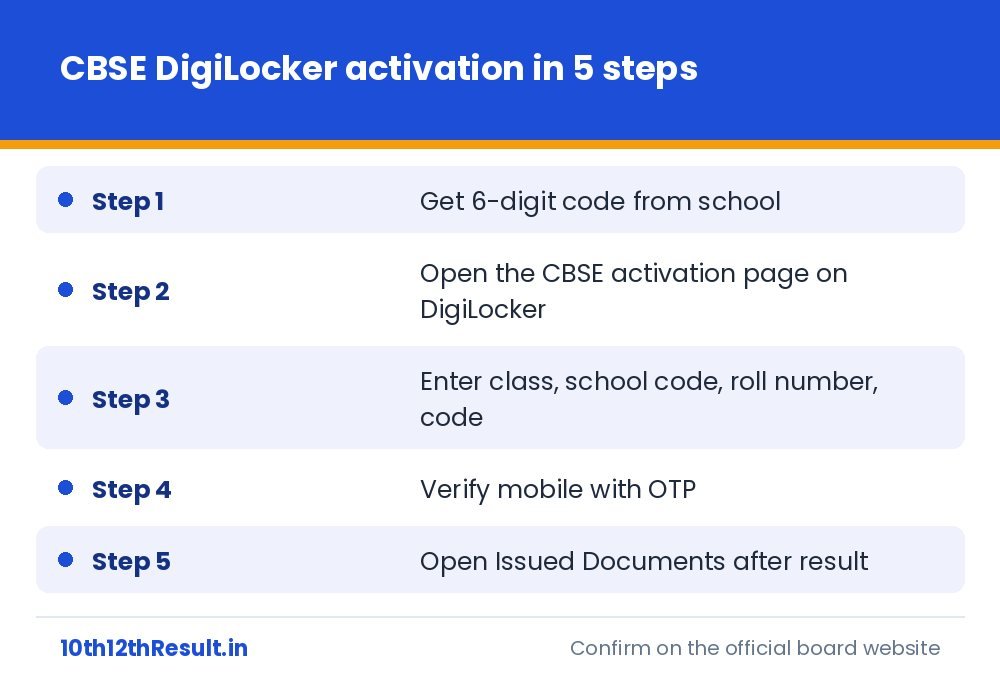
- Collect the access code from your class teacher or the school office.
- Open the CBSE account activation page on DigiLocker (the link is given in the CBSE circular and on cbse.gov.in under “DigiLocker”).
- Choose your class, then enter the school code, your roll number and the six-digit code.
- Confirm your details and enter a mobile number. An OTP is sent to it.
- After OTP verification the account is active. If you already had a DigiLocker account on that number, the CBSE records are linked to it.
Download the marksheet after the result
Sign in at digilocker.gov.in or in the app and open Issued Documents. You will find the marksheet-cum-passing certificate, and later the migration certificate. Tap the document to view it and use the download icon for a PDF.
Website result vs DigiLocker document
| Point | Result website | DigiLocker |
|---|---|---|
| Nature | Provisional display of marks | Digitally signed document |
| Accepted for admission | Usually for provisional admission only | Accepted as a valid document |
| Login needed | No | Yes, one-time activation |
| Load on result day | Very high | Generally smoother |
Problems students face
My school has not given the code
Ask the school to download it from its DigiLocker school account. Private candidates are told how to get their code in the CBSE notice for private candidates.
The code is shown as invalid
Check that you selected the correct class and typed the school code, not the centre number. If it still fails, the school can re-download your code.
My mobile number is already linked to another DigiLocker account
Sign in to the existing account; the CBSE documents can be pulled into it using the same roll number and year.
My name is wrong in the document
DigiLocker only displays CBSE data. Apply for correction through your school to the CBSE regional office.
Keep a backup
Download the PDF, store it in your email and print two copies. Also collect the printed marksheet from school when it arrives; some institutions still ask for the hard copy at the time of final verification. For other ways to see your marks, read how to check the CBSE result.
This is an independent information website and is not affiliated with any education board. Always confirm dates and rules from the official board notification.
Related guides
CBSE Passing Marks 2027 and Supplementary Exam Rules for Class 10 and 12
What "33%" really means in CBSE, how theory and practical are counted in Class 12, what Compartment and Essential Repeat mean on…
CBSE Class 10 Two Board Exams 2027: How the Result and Best Score Work
CBSE now holds two board exams for Class 10. Understand which exam is compulsory, who can sit the second one, how the…
CBSE Verification of Marks and Re-evaluation 2027: Step-by-Step Process
Not happy with a CBSE score? Learn the order in which you can ask for your answer book copy, verification and re-evaluation,…
CBSE 12th Result 2027 Date: When to Expect It and What Decides the Timing
The CBSE Class 12 exams 2027 start on 16 February. Here is the realistic result window, the signals that tell you the…